How to Remove the AI Mode Button in Chrome
Updated
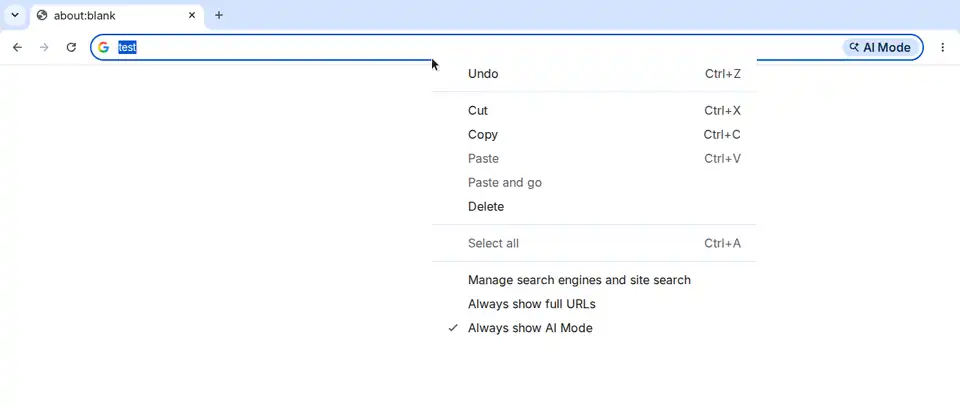
Chrome Help says to hide "AI Mode" and "Add tabs and more" from the address bar, right-click the address bar and unselect Always show AI Mode. That is the documented control, as of Oct 2026. Tested on Chrome 156.0.8078.47, Oct 22 2026, unchecking it removed the AI Mode button from the address bar. It does not remove AI Overviews or the AI Mode tab on google.com. For those, use Google without AI or udm=14. In Edge, see how to turn off AI Overviews in Edge.
Hide the address-bar shortcuts
Chrome Help, checked on , says: to hide "AI Mode" and "Add tabs and more" from the address bar, right-click on the address bar, then unselect Always show AI Mode. The same page says AI Mode in Chrome is not available to everyone or on every device, and that it is gradually coming to people outside the US and to non-English languages.
Tested on Chrome 156.0.8078.47, Oct 22 2026. In a fresh profile the address-bar menu included Always show AI Mode, and it was checked. With the word test in the address bar, an AI Mode button sat on the right. This build did not show a control labeled Add tabs and more in that bar.
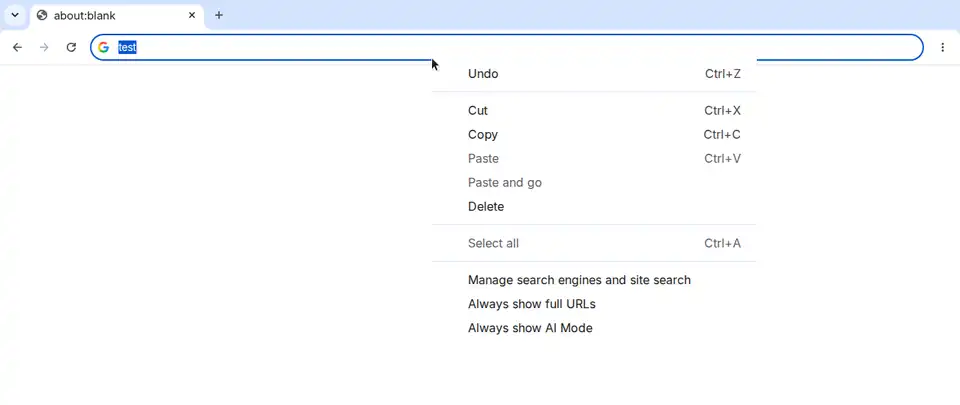
Unchecking Always show AI Mode cleared the check mark. Typing test again left the address bar without that button. Chrome Help also says you can open AI Mode from the right side of the address bar, or with Tab + Enter, when the feature is available to you. Those two shortcuts were not tried.
Flags in Chrome 156, as of Oct 2026
On we opened chrome://flags in Chrome 156.0.8078.47 on Linux. The page title was Experiments, and the page showed that version number. A search for AI Mode returned 4 experiments. None is titled AI Mode omnibox entrypoint. The full flags list also had no experiment titled Search with AI Mode.
The descriptions below are the text on that flags page. They do not say that Disabled removes the AI Mode button. We did not set any experiment to Disabled, and we did not relaunch Chrome, so we do not know whether changing one hides the button. Flag names differ by version. The spelling "behaviour" is the flags page's own spelling.
| Name on chrome://flags | Flag id | What that page says | Platforms listed |
|---|---|---|---|
| AIM 3P entrypoint | aim-3p-entrypoint | Enables the omnibox AI Mode entrypoint for third party search engines. | Mac, Windows, Linux, ChromeOS, Android |
| Omnibox Dynamic AI Mode Button | omnibox-dynamic-ai-mode-button | Enables dynamic behaviour for the AI mode button in the WebUI Omnibox. | Mac, Windows, Linux, ChromeOS |
| NTP Realbox Dynamic AI Mode Button | ntp-realbox-dynamic-ai-mode-button | Enables dynamic behaviour for the AI mode button in the NTP Realbox. | Mac, Windows, Linux, ChromeOS |
| Omnibox AI Mode Space Does Not Activate | omnibox-ai-mode-space-does-not-activate | If enabled, pressing space when the AI mode button has focus will insert a space into the omnibox instead of activating the button. | Mac, Windows, Linux, ChromeOS |
The same flags page also listed these experiments. They use AIM or Composebox in the title, so they were not part of the 4-result AI Mode search. We are not telling you to turn them off.
| Name on chrome://flags | Flag id | What that page says | Platforms listed |
|---|---|---|---|
| NTP Composebox | ntp-composebox | Shows the Composebox on the New Tab Page Searchbox upon clicking the entrypoint. | Mac, Windows, Linux, ChromeOS, Android |
| Composebox Persistent AIM Button (Omnibox) | composebox-persistent-aim-button-omnibox | Persists the AIM button in the Omnibox Composebox. | Mac, Windows, Linux, ChromeOS |
| Composebox Persistent AIM Button (Realbox) | composebox-persistent-aim-button-realbox | Persists the AIM button in the Realbox Composebox. | Mac, Windows, Linux, ChromeOS |
The flags page warns: experimental features could lose browser data or compromise your security or privacy, enabled features apply to all users of this browser, and an enterprise admin should not use these flags in production. It also lists Temporarily unexpire M154 flags and Temporarily unexpire M155 flags, described as flags that expired as of that version and will be removed soon.
New Tab page
Chrome Help says that on a computer you open Chrome, open a New Tab page, and select AI Mode on the right of the search box. On Oct 22, 2026, in Chrome 156.0.8078.47, a New Tab opened after the address-bar item was unchecked. The document was empty, so that search box was not on screen.
The flags page does list NTP Composebox, #ntp-composebox, with the description in the table above. We did not confirm that the flag changes the New Tab page.
This does not change google.com
Address-bar and New Tab controls are Chrome's interface. They leave the AI Mode tab on google.com and AI Overviews on the results page as they are. Google's help page says the Web filter "This filter displays only text-based links without features like AI Overviews." Google has no switch that turns AI Overviews off. The steps for that filter are on Google without AI and udm=14. Edge is covered on turn off AI Overviews in Edge.
Work or school policy
On we downloaded Google's Chrome policy template package 156.0.8078.48 from dl.google.com/chrome/policy/policy_templates.zip. The installed browser that day was Chrome 156.0.8078.47, one patch below that package. We did not apply the policy on a managed computer.
The package's Windows ADMX and the English ADML name the policy AIModeSettings. The display string is "Settings for Google's AI Mode integrations in the address bar and New Tab page search box." It sits in the Generative AI category. The registry value is Software\Policies\Google\Chrome\AIModeSettings. The ADML says 0 means the feature will be available to users, and 1 means the feature will not be available to users. The choice labels are "Allow AI Mode integrations" and "Do not allow AI Mode integrations." Google must be the default search engine. If the policy is unset, GenAiDefaultSettings decides. The HTML policy list in the same package says support starts at Chrome 138 on Windows, Mac, Linux, ChromeOS, Android, and iOS.
A separate policy in that package, ThirdPartyAiChatSettings, covers third-party AI Mode integrations in the address bar and New Tab search box. It is not the Google button policy. Neither policy is a switch for AI Overviews on google.com.
After a Chrome update
The flags page in this build says expired flags will be removed soon. If a flag you were using is gone after an update, use the right-click step on Chrome Help. That step does not depend on a flag name. We have not watched a flag reset itself across an update.
Sources
- Use AI Mode in Chrome, Google Chrome Help, read on Oct 22, 2026. This is the source for Always show AI Mode and for the New Tab search-box control.
- Headed Chrome 156.0.8078.47 on Linux, Oct 22, 2026. chrome://version showed 156.0.8078.47 (Official Build). This is the source for the address-bar menu, the check mark, and the AI Mode button before and after it was unchecked. chrome://flags in the same version is the source for the flag names, ids, descriptions, platforms, the experimental-features warning, and the M154 and M155 unexpire entries.
- Chrome policy templates 156.0.8078.48, downloaded on Oct 22, 2026, files windows/admx/chrome.admx, windows/admx/en-US/chrome.adml, and common/html/en-US/chrome_policy_list.html. Public summary: AIModeSettings.
- Google's Web filter help, for the statement that the filter shows text links without AI Overviews.
What we have not tested yet
- Pending test. Flag changes, a rendered New Tab search box, and AIModeSettings on a managed computer are still unchecked.
Questions
Does unselecting Always show AI Mode remove the button?
Tested on Chrome 156.0.8078.47, Oct 22 2026. Unchecking Always show AI Mode removed the AI Mode button from the address bar. Chrome Help documents that menu item.
Which flag removes the AI Mode button in Chrome 156?
Chrome 156.0.8078.47 lists four experiments when you search chrome://flags for AI Mode, and none is titled AI Mode omnibox entrypoint. We did not set any of them to Disabled, so we do not know if that removes the button.
Does this turn off AI Overviews on google.com?
No. These controls are Chrome's address bar and New Tab page. AI Overviews are covered on the Google without AI page.
Is there a Chrome policy for the AI Mode button?
The Chrome policy template package 156.0.8078.48 names the policy AIModeSettings. Setting it to 1 means do not allow AI Mode integrations in the address bar and New Tab page search box. We have not applied it on a managed computer.
Will a Chrome update bring the button back?
This build's flags page says some flags expired in M154 and M155 and will be removed soon. If a flag disappears, use the right-click step on Chrome Help, which does not depend on a flag name.