How to Turn Off Google AI Overviews in Edge
Updated
Google has no off switch for AI Overviews. Google's help page says the Web filter "This filter displays only text-based links without features like AI Overviews." Tested on Microsoft Edge 155.0.4283.62, Oct 22 2026. In that build, as of Oct 2026, a custom address-bar engine using https://www.google.com/search?q=%s&udm=14 was saved, set as the default, and used for an address-bar query. Chrome's own setup is on the udm=14 page. This page does not repeat it.
Add a udm=14 search URL in Edge
On we opened settings in Microsoft Edge 155.0.4283.62 on Linux. edge://settings/searchEngines loaded edge://settings/privacy/services/search/searchEngines. The breadcrumb read Privacy, search, and services, then Search and connected experiences, then Address bar and search, then Search engines.
Microsoft's Edge help page still says "Search and connected services". This build's label was "Search and connected experiences". Use the label on your screen if the two differ.
- Open Microsoft Edge on a computer.
- Open
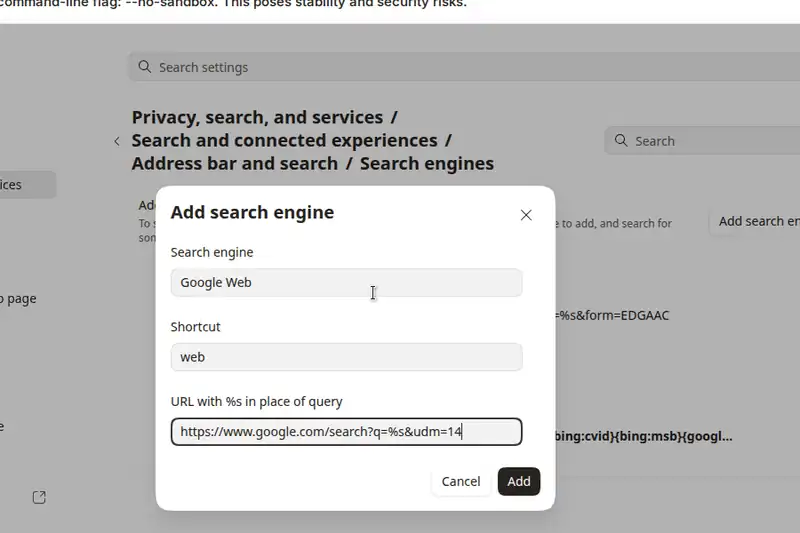
edge://settings/privacy/services/search/searchEngines, or follow the breadcrumb above. - Under Address bar search engines, select Add search engine. The form fields we saw were Search engine, Shortcut, and URL with %s in place of query, with Cancel and Add.
- For the URL, use
https://www.google.com/search?q=%s&udm=14. A name such as Google Web and a shortcut such as web fit the fields.%sis where the query goes.
https://www.google.com/search?q=%s&udm=14Tested on Microsoft Edge 155.0.4283.62, Oct 22 2026. The three fields were filled with keystrokes: Google Web, web, and https://www.google.com/search?q=%s&udm=14. Add was enabled. Clicking it showed the status Search engine added, and the grid gained a row with that name, shortcut, and URL. An empty URL field on the same form had shown "Website format is incorrect."
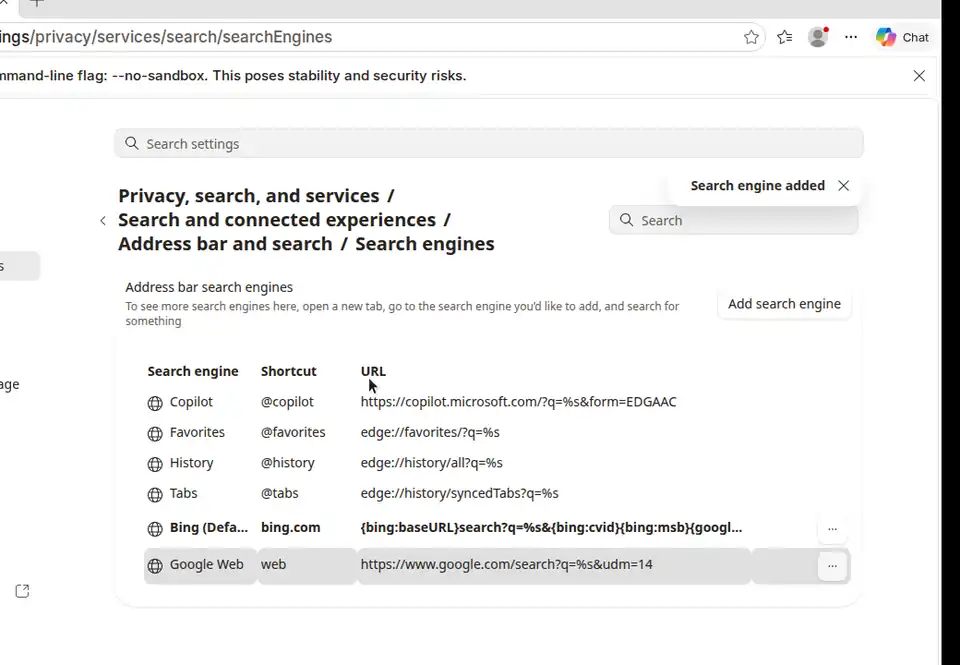
The same page says: "To see more search engines here, open a new tab, go to the search engine you’d like to add, and search for something" That is a second way Edge offers to add an engine. We did not complete a search in a new tab and then return to this list.
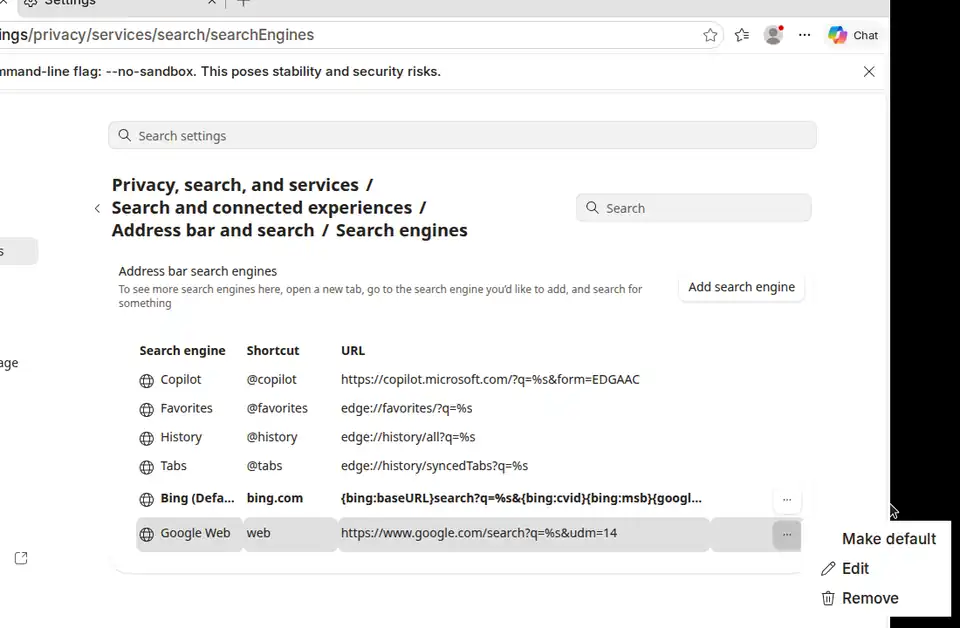
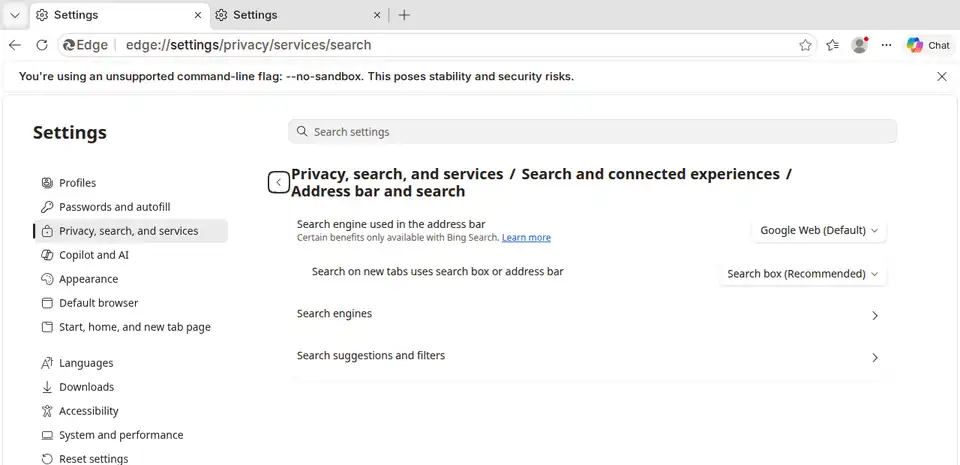
The row's ... menu listed Make default, Edit, and Remove. Clicking Make default, then reloading, changed the row name to Google Web (Default). On edge://settings/privacy/services/search, Search engine used in the address bar then read Google Web (Default). That page still said "Certain benefits only available with Bing Search." The built-in Google row is a different URL, below.
Choosing the built-in Google row is not the udm=14 URL. In this build its template was {google:baseURL}search?q=%s&{google:RLZ}{google:originalQueryForSuggestion}{google:assistedQueryStats}{google:searchboxStats}{google:searchFieldtrialParameter}{google:language}{google:prefetchSource}{google:searchClient}{google:sourceId}{google:searchSource}{google:contextualSearchVersion}ie={inputEncoding}. That string does not contain udm=14.
Address-bar query
Tested on Microsoft Edge 155.0.4283.62, Oct 22 2026, after Google Web was the default. Typing udmcheck in the address bar offered "udmcheck - Google Web Search". Enter opened a Google robot-check page. Its address bar contained a continue link for https://www.google.com/search?q=udmcheck&udm=14. The results list was not shown. A search started from the google.com homepage is still unchecked.


Copilot is a different search
The same Edge list includes Copilot, shortcut @copilot, URL https://copilot.microsoft.com/?q=%s&form=EDGAAC. That URL is on copilot.microsoft.com, not a Google results page. People who search for turning off an AI overview in Edge often land on pages about Edge's own AI. Those are not Google AI Overviews. edge://settings/copilot opened edge://settings/profiles in this build, so this page does not give steps for turning Copilot off.
Chrome
For Chrome on a computer, follow set udm=14 as your default search. This page does not repeat Chrome's settings. Hiding Chrome's AI Mode button is separate: remove the AI Mode button in Chrome. AI Overviews on google.com are also covered on Google without AI.
On a phone instead? See our guide to turning off AI Overviews on iPhone and Android.
Extensions
We did not open an Edge Add-ons listing on Oct 22, 2026, so this page does not name one. An extension can read what you search. The address-bar URL does not need an extension.
Sources
- Microsoft Edge 155.0.4283.62 on Linux, Oct 22, 2026. edge://version showed that version (Official build). This is the source for the saved Google Web row, Make default, the reloaded default, the address-bar query udmcheck, and the robot-check URL. The same session is the source for the built-in URL templates, the empty-URL message, and the Copilot URL. The window showed a notice for the --no-sandbox startup flag used in this check.
- Change your default search engine in Microsoft Edge, Microsoft Support. Its menu label "Search and connected services" did not match this build.
- Google's Web filter help, for the statement that the filter shows text links without AI Overviews. The udm parameter is not documented there. See what udm=14 is.
What we have not tested yet
- Pending test. A google.com homepage search, an Edge Add-ons listing, and turning Copilot off are still unchecked.
Questions
Can you turn off AI Overviews in Edge?
Google has no off switch for AI Overviews. Tested on Microsoft Edge 155.0.4283.62, Oct 22 2026, saving a udm=14 address-bar engine and choosing Make default made that engine the default. A query then opened a Google URL containing udm=14, and the results page was a robot check.
Does choosing Google in Edge's menu hide AI Overviews?
No. In Edge 155.0.4283.62 the built-in Google row is a normal Google URL template, and it does not contain udm=14. The custom URL is the one that adds udm=14.
Is Copilot the same as a Google AI Overview?
No. Edge's search-engine list includes Copilot, and its URL is on copilot.microsoft.com. We have not turned Copilot off.
How do I do this in Chrome?
Chrome's address-bar setup for udm=14 is on the udm=14 page. This page does not repeat those steps.
Does a search from the google.com homepage stay free of AI Overviews?
The settings on this page are for the address bar. A search started on the google.com homepage is still unchecked.